Photo proofing apps compared: Photoproof.io, Pixieset, Pic-Time and more
A practical comparison of Photoproof.io, Pixieset, Pic-Time, ShootProof and Picflow: selections, approvals, delivery, pricing and the right fit for your studio.
Sending photographs is easy; getting an unambiguous decision back can be harder. A client gallery may look polished while leaving you unsure which frames are approved, whose list is final or whether a note refers to the latest version. Proofing is the stage where a set of possibilities becomes an instruction to continue work. Delivery is the stage where finished files reach the client. Selling prints is another job again.
This guide compares official vendor information checked on November 20, 2026. It is a documented feature comparison, not a hands-on speed test or a ranked award. The right service depends on whether your business needs a focused selection step, a wider gallery storefront or a creative team’s review workspace. The table gives a starting point; use the same small client assignment to evaluate your shortlist.
| Service | Workflow to investigate | Check before choosing |
|---|---|---|
| Photoproof.io | Select, reject, comment, confirm and deliver finals | Gallery expiry; no built-in store or studio administration |
| Pixieset | Client favorites, comments, delivery and gallery sales | Gallery plan versus Suite; storage and sales charges |
| Pic-Time | Delivery galleries, client selections and print sales | Workflow features by tier; promotion and renewal terms |
| ShootProof | Proofing galleries alongside sales and studio tools | Plan limits and the functions your studio actually uses |
| Picflow | Asset-level feedback, annotations and approvals | Review-tool access and the required team workflow |
Photoproof.io: a focused selection and confirmation route
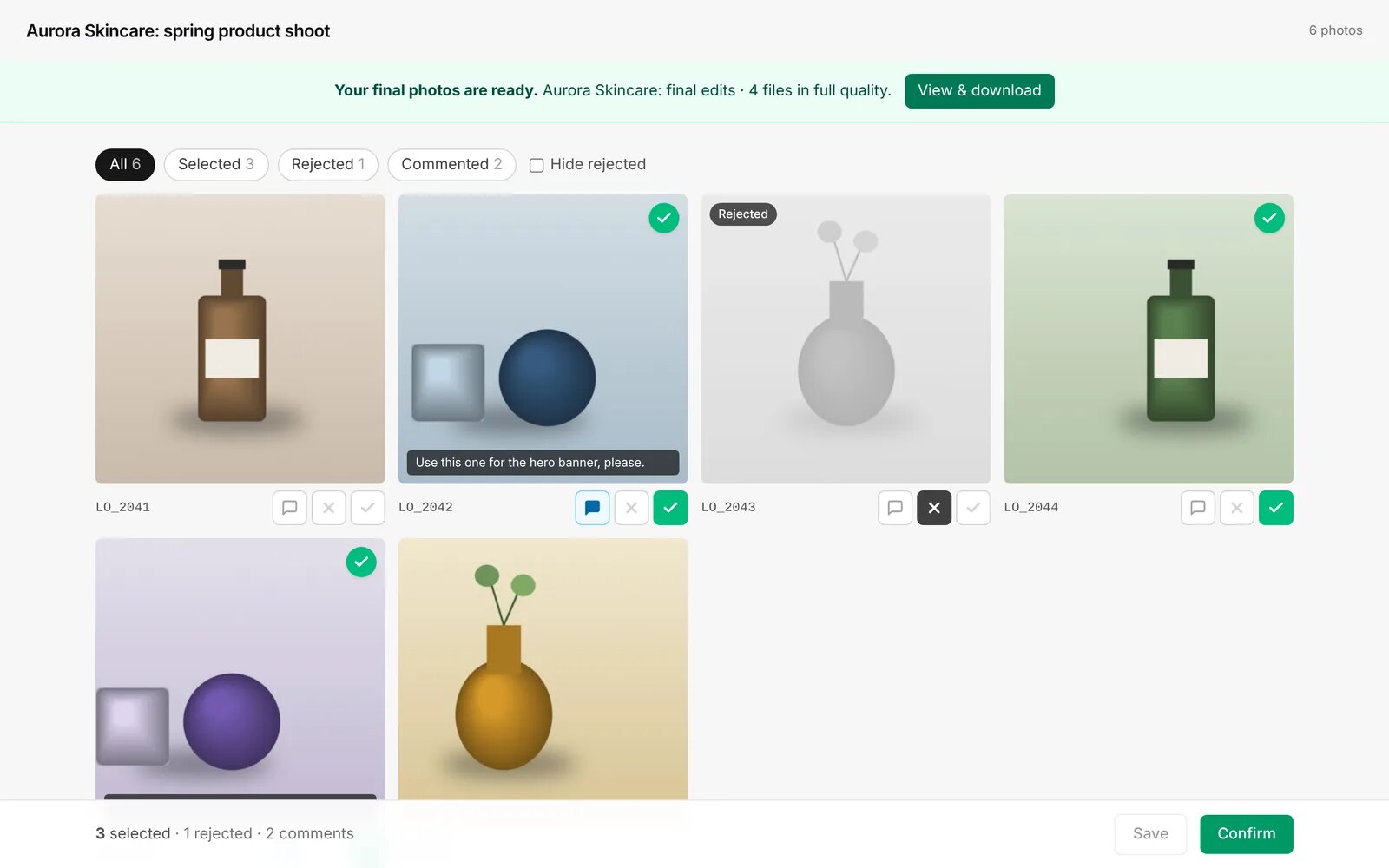
Photoproof.io describes a link-based workflow with no client account required: clients select, reject and comment, then confirm their choices. The site also documents selected photo codes for Lightroom and final-file delivery. That combination is relevant when the main problem is turning feedback into a stable editing list, rather than building a print business inside the gallery. It is a focused option to investigate alongside broader platforms.
Its published Free plan provides 2 GB with galleries lasting 30 days. Pro is listed at €8 monthly or €72 annually; a €5 Gallery Pass offers a one-off gallery upgrade. The pricing page says euro prices include VAT. The site explicitly excludes a print or digital store, a portfolio website, contracts and invoicing. Those limits matter: a focused tool can be a good fit without replacing every part of a studio.
Pixieset: galleries connected to a broader business platform
Pixieset’s Client Gallery documentation includes favorites, comments, selection export and photo delivery, with storefront integration. It is a relevant candidate when the gallery is both a client experience and a sales channel. Its wider products include website and studio tools, but compare the actual product or bundle you would use rather than assuming that every item shown across the platform belongs to one basic gallery subscription.
The official gallery pricing page lists a 3 GB Free plan and Basic at $8 per month billed annually or $10 month to month. It lists a 15% store commission on Free and commission-free sales on upgraded accounts. Payment processing and other costs still need checking separately. Decide whether the sales and presentation features serve your clients before comparing storage numbers alone with a proofing-focused service.
Pic-Time: consider the gallery and print-sales journey together
Pic-Time’s Client Delivery Suite page combines galleries, print-shop features and client workflows, including selections and album proofing in its plan comparison. It belongs on a shortlist when the relationship after delivery matters: albums, prints, family sharing and further purchases may be part of the business model. Verify which workflow tools are included at your intended tier, because the plan table distinguishes levels of functionality.
Its retrieved page shows several plans and promotional annual prices, so this article does not present one discounted figure as a permanent starting cost. Compare the renewal price, storage, relevant client workflow and the sales arrangements that apply to your region. A gallery designed to support purchases can be valuable, but that value should come from your actual client journey rather than the expectation that a store automatically creates demand.
ShootProof: proofing alongside studio administration
ShootProof’s official site presents proofing and client galleries together with print sales, contracts, invoices and booking tools. That breadth makes it a sensible candidate when you want several client-facing stages under one provider. The evaluation should include the handoff between them. Can a person move from an agreement to a gallery and a final order in the way your business needs, without confusing which action completes each stage?
Check the live plan details and any limits against your expected workload. A package that consolidates several tools may justify a different budget from a simple selection gallery, but consolidation is useful only if the included functions actually replace work you do elsewhere. Use a realistic sample job and assess the client’s view as carefully as the photographer’s dashboard. Feature breadth and a clear experience are separate questions.
Picflow: feedback attached to the creative asset
Picflow’s online-proofing documentation emphasizes comments, annotations, labels and approvals on photos, video and design work, with reviewers able to participate without creating an account. It is a relevant option for a commercial photographer working with designers, producers and several decision-makers. The question is often more detailed than which images are favorites: exactly which area needs a revision, and who has approved the result?
Compare the precise review tools and plan limits your team needs. More collaboration controls are useful when they resolve a real approval problem, but they can also introduce choices that a small portrait client does not need. Trial the review from both sides with the same brief. Ask whether the returned feedback is clearer, not merely whether the workspace offers more ways to leave it.
Test the decision, not just the gallery design
Upload a small set with stable, readable filenames and send one concise brief: choose a stated number, add a specific revision note and indicate when the selection is final. Ask a reviewer unfamiliar with the tool to complete that task on a phone. Then retrieve the result on the photographer’s side. Check the identifiers against your originals before beginning any detailed editing. This is a proposed comparison method, not a test result.
Include an awkward situation: two reviewers prefer different frames, someone changes a choice, or a final file needs replacing. Discover how you would record the authorized instruction. Also check retention, download permissions and how you will preserve approvals outside an expiring gallery. Keep your own originals and finished files. A convenient client interface should not become the only place where the project’s essential record exists.
Choose around the work you need to finish
For a focused selection and confirmation step, investigate Photoproof.io. For galleries connected to print sales and a wider photography business, compare Pixieset, Pic-Time and ShootProof at the relevant tiers. For detailed review across a creative team’s assets, investigate Picflow. These are workflow matches, not claims that one vendor wins every category. The best choice makes the client’s decision clearer and the next editing action easier to identify.