Lightroom’s new AI fixes raise a bigger question: what still counts as the photograph?
Open Eyes, Glow, Blemish Removal and expanded tethering promise faster work. The useful response is a clearer capture, edit and disclosure policy.
Adobe’s November Creative Cloud announcement puts four photography changes inside the same Lightroom story: Open Eyes, Glow, Blemish Removal and wider tethering support. They do not all do the same kind of work. One changes a person’s visible expression, one adds an optical-style effect, one automates local retouching and one reorganizes the live shoot. Treating them as a single list of conveniences misses the editorial question: which result is still a correction of the captured moment, and which result constructs a different one?
Adobe says the capabilities are generally available except Open Eyes, which is in beta. This is an analysis of Adobe’s documentation checked on 22 November 2026, not a GOBO quality test. The company’s descriptions establish intended functions and availability; they do not prove that every face, camera or production setup will work equally well.
Open Eyes changes content, not only finish
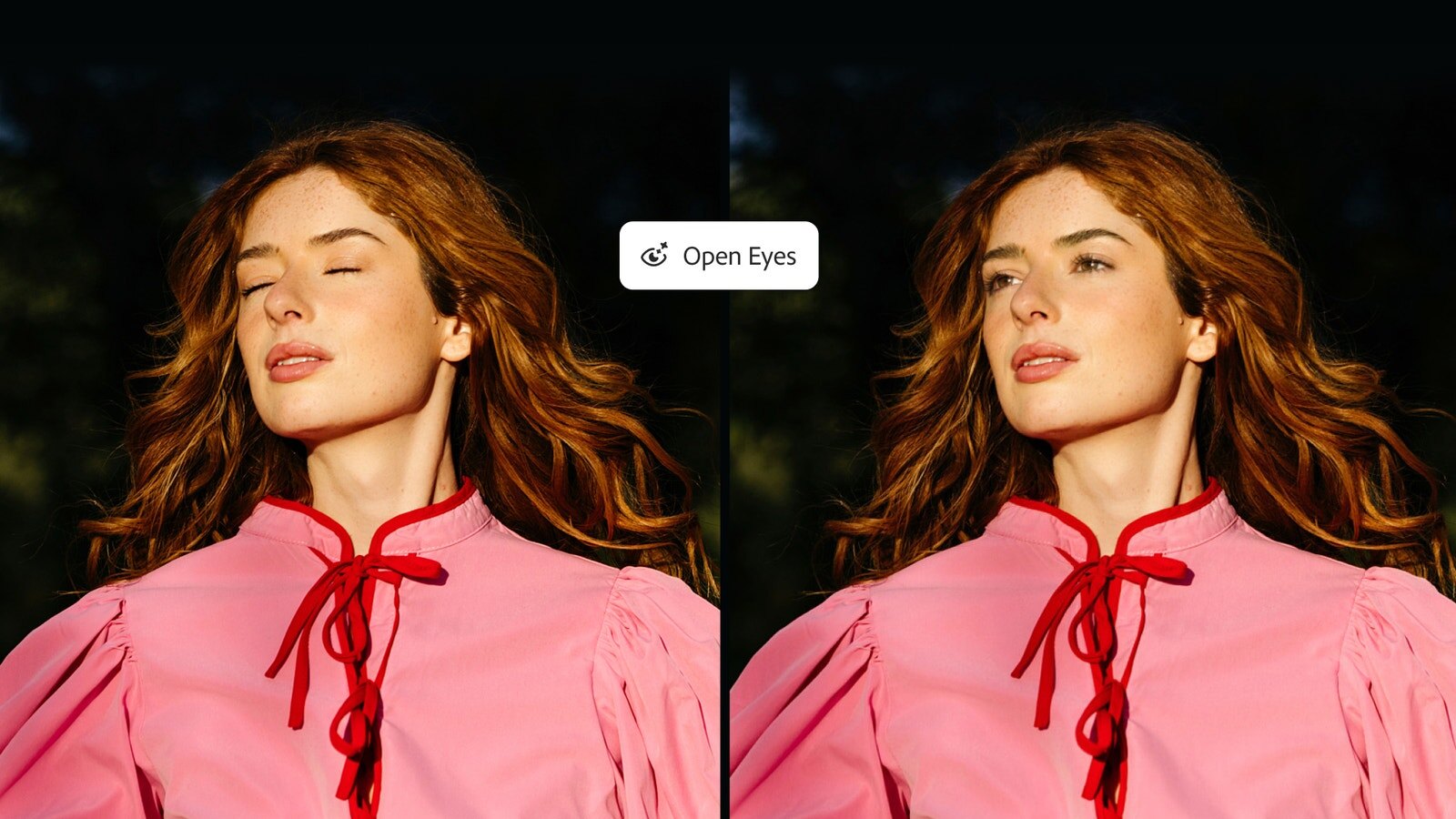
Adobe’s mobile introduction says Open Eyes detects a closed-eye photograph and can use another library image of the person as a reference for eye color, shape and size. The broader November announcement describes the feature as beta.
That distinction matters. Adjusting exposure reveals recorded tonal information; substituting eyes imports information from another moment. The result may look entirely natural and still no longer document the exact expression captured in that frame. For a private family album, the family may welcome that trade. For documentary work, a competition, evidence or an image presented as an unaltered instant, it can be unacceptable.
The practical rule is not “AI is forbidden.” Decide the allowed transformation before delivery. Keep the original, identify the reference and record which derivative used the feature. If a subject’s appearance has meaning beyond cosmetic polish, obtain the appropriate approval and disclose the intervention where the context requires it.
| Capability | What changes | Review before delivery |
|---|---|---|
| Open Eyes (beta) | Replaces closed eyes using a reference image | Identity, gaze, consent and disclosure |
| Blemish Removal | Automates a local portrait correction | Skin texture and the client’s retouching brief |
| Glow | Adds diffusion or halation-style light effects | Clipping, color shifts and consistency across a set |
| Camera Tethering | Moves live review and organization closer to capture | Supported hardware, storage and approval ownership |
Blemish Removal needs a human definition of temporary
Adobe’s product overview says Blemish Removal moves from mobile into Lightroom with additional controls and aims to preserve features such as freckles. That is a vendor description, not a guarantee about every skin type or lighting condition.
Portrait retouching has always involved judgment. Automation makes that judgment easier to repeat before anyone has defined it. A useful client brief can distinguish temporary distractions—lint, a recent spot, a makeup smudge—from permanent characteristics such as scars, moles, freckles and texture. It can also specify whether the photographer may make those choices or must supply a proof first.
Review a face at the intended output size, then at higher magnification for artifacts. Perfect skin at 200 percent can become implausible skin in print. Compare the edited portrait with adjacent photographs from the set; an isolated correction may be subtle while a whole gallery becomes inconsistent.
Glow is a look, not recovered light
Adobe describes Glow as a way to add soft cinematic light, including diffusion and halation-style options. Those words describe an effect. They do not mean the software has reconstructed light that physically existed outside the exposure.
That makes Glow closer to creative grading than repair. It can unify a portrait series or make bright sources spread attractively, but it can also reduce local contrast, shift apparent sharpness and push saturated highlights toward clipping. Apply the effect while viewing the brightest channels and the complete sequence, not only a favorite frame.
Save a neutral version alongside the styled export. A wedding client, magazine designer or brand may later need cleaner skin tone, more text space or a print process that does not suit the glow. A reversible decision is more valuable than an effect baked into the only high-resolution file.
Tethering turns Lightroom into part of the set
Adobe says Camera Tethering is improved across Lightroom on desktop and iPad, supporting live review, organization and collaboration during capture. The operational benefit is clear: a larger display can reveal focus, styling and composition problems before the set is dismantled. But “supported” must be tested with the exact camera, cable or network, operating system and storage plan.
Run a short rehearsal before a paid session. Confirm file destination, naming, duplicate storage, disconnect recovery and whether a reviewer’s rating changes the master catalog or only a shared view. Assign one person to distinguish creative feedback from final approval. A client saying “I like this” beside the camera is not automatically a legal release or a finished retouching instruction.
Use a four-level edit record
A small studio does not need a forensic database for every portrait. It does need a vocabulary. Mark delivery notes as capture adjustment, local retouch, generative substitution or creative effect. Open Eyes falls in generative substitution; Blemish Removal is local retouch when it removes an agreed distraction; Glow is a creative effect; tethering belongs to capture workflow.
For a group portrait, keep the original RAW files, the selected base frame, the reference used for any substituted eyes and the final export. For a beauty commission, attach the retouching brief to the job. For editorial work, follow the publication’s manipulation policy rather than assuming a natural-looking result is permitted.
What photographers should test first
Build a controlled set of ten difficult images: glasses, side light, motion, partial faces, different eye colors, textured skin and mixed exposure. Process them with the new tools, record failures and compare exports on a second display. For tethering, disconnect the camera deliberately and confirm what survives. Do not begin with the best-case sample Adobe used to explain the feature.
The real development is not that Lightroom can fix a blink. It is that capture, selection, retouching and collaboration are moving closer together. Speed is useful only when the studio preserves the decisions that speed can conceal. A clear policy lets photographers use the new tools without pretending every plausible image is the same kind of photograph.